
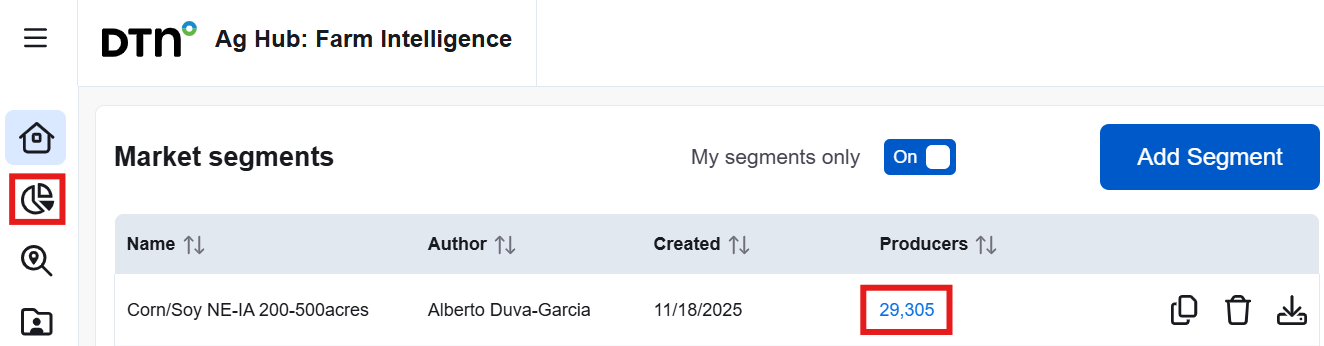
Click the number of Producers or the pie chart icon on the left to access a segment.
Within this page, you can easily navigate to another created segment by clicking the dropdown arrow at the top left corner.
On the Opportunity Finder page, a list of the top 200 producers by planted acres within the selected segment is shown in both the table and on the map. You can explore each producer’s details and refine the list by sorting columns or applying filters in the left panel. Filter options are based on the attributes of the segmented producers, so only relevant choices will appear. For example, if no producer grows sorghum, it will not be listed in the planted acres dropdown. Some filters allow you to set minimum and maximum thresholds to narrow the list. These filters do not affect the segment itself and can be adjusted or removed at any time.

The Filters pane provides multiple options to further refine the current segment by Role, Persona, Location, Planted acres, Number of fields, Grain storage, Brands used, Gross farm income, and Available contact information. You can use as many filters as you need to enhance your search results.
The interactive map displays points based on the addresses of segmented producers. If producers were included based on field locations, some addresses may appear outside the selected geography. You can pan and zoom using your mouse or the plus and minus icons to explore the map.
Hover over any point on the map to see the producer’s name and address. Clicking a point will focus on that producer by removing all others from the map and displaying their associated fields. The table below will update to show only that producer’s information. In the first column, each producer name or company name is a clickable link that opens their profile in a new browser tab. To return to the full list of producers and fields, click the “Show all” button.
If you do not immediately see the fields, try zooming or panning. Producers may have fields both inside and outside the segment’s geography. If no fields appear, check the table for planted acres and field count. Low values may explain why the fields are hard to locate. Additional tools are available to help identify these fields if needed.

Clicking the arrow icon will jump the map view to your current geographic location, making it easier to explore nearby fields or producers. The Layers icon allows you to select between Streets or Satellite view.
The list of producers can be sorted by using the up and down arrows (↑↓). Additional columns can be added by clicking the Columns button and checking them from the list. Click any producer name from the list to view the Grower’s profile.
Related articles: